Prayer times: method, Asr and adjustments
Pick a calculation method, set Hanafi or standard Asr and match your printed timetable.
On this page
MasjidOS calculates prayer times on your server from your latitude, longitude, timezone and the settings below. Nothing is fetched from an outside service unless you choose to.
Location and timezone
Set the mosque name, city, country, timezone, latitude and longitude in MasjidOS → Settings → Profile. The profile page shows an accuracy checklist and a seven-day preview you can compare with your printed board. The timezone is the most common cause of times that look wrong. Use your real city timezone (for Bangladesh, Asia/Dhaka), not UTC. Coordinates are more accurate than the city name: right-click your mosque on Google Maps and copy the two numbers, or press Detect My Location.
Calculation method
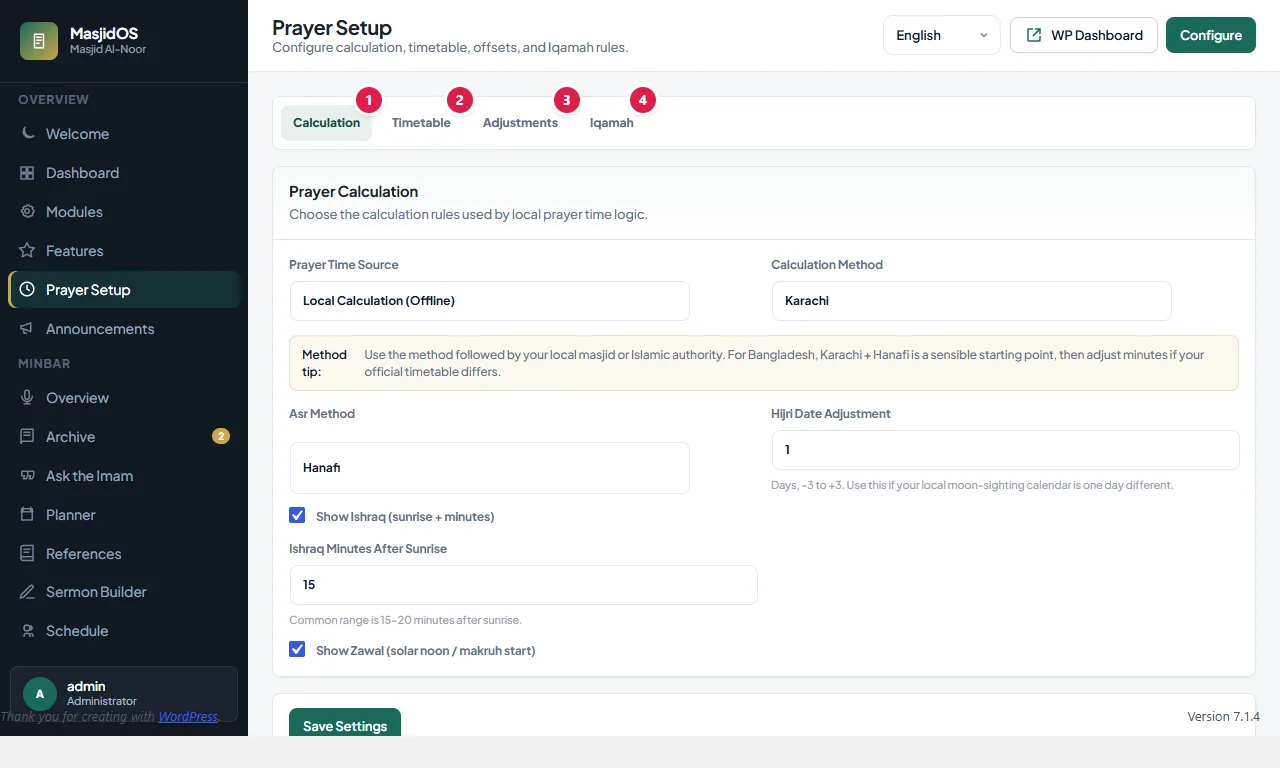
Open MasjidOS → Prayer Setup → Calculation and choose the method your local religious authority follows. The built-in methods are:
- Karachi (the default)
- Muslim World League
- ISNA
- Egyptian Authority
- Umm al-Qura, Makkah
- Dubai
- Qatar
- Kuwait
- Singapore
- Tehran
- Jafari
The Asr setting is Hanafi (the default) or Standard. Bangladesh often starts with Karachi and Hanafi. Please confirm your times with your local religious authority before you publish them.
Match your printed board
If your mosque’s printed timetable differs by a few minutes, open Prayer Setup → Adjustments and add or subtract minutes per prayer (Fajr, Sunrise, Dhuhr, Asr, Maghrib and Isha, from -60 to +60). For example, add 2 minutes to Maghrib. Adjustments apply to the widget, the monthly timetable and the TV display.
Hijri date
The Hijri date has an adjustment of -3 to +3 days, on the Calculation tab, so it can follow your local moon sighting. It affects the prayer widget, the Islamic calendar and the TV display.
Ishraq and Zawal
The Calculation tab also lets you show or hide the Ishraq time (sunrise plus a number of minutes, commonly 15 to 20) and the Zawal time (solar noon, when prayer is disliked to begin). The monthly timetable leaves them out unless you add extras="yes".
Optional: Aladhan API
By default the Prayer Time Source is Local Calculation (Offline). If you prefer, choose Auto API (Aladhan.com) and the monthly timetable is fetched from api.aladhan.com. The city, country, method and Asr school are sent with the request. See Privacy and outside services.