Iqamah times and the monthly timetable
Fixed or rule-based Iqamah, a printable monthly timetable, and CSV import for your own board.
Iqamah (Jamaat) times
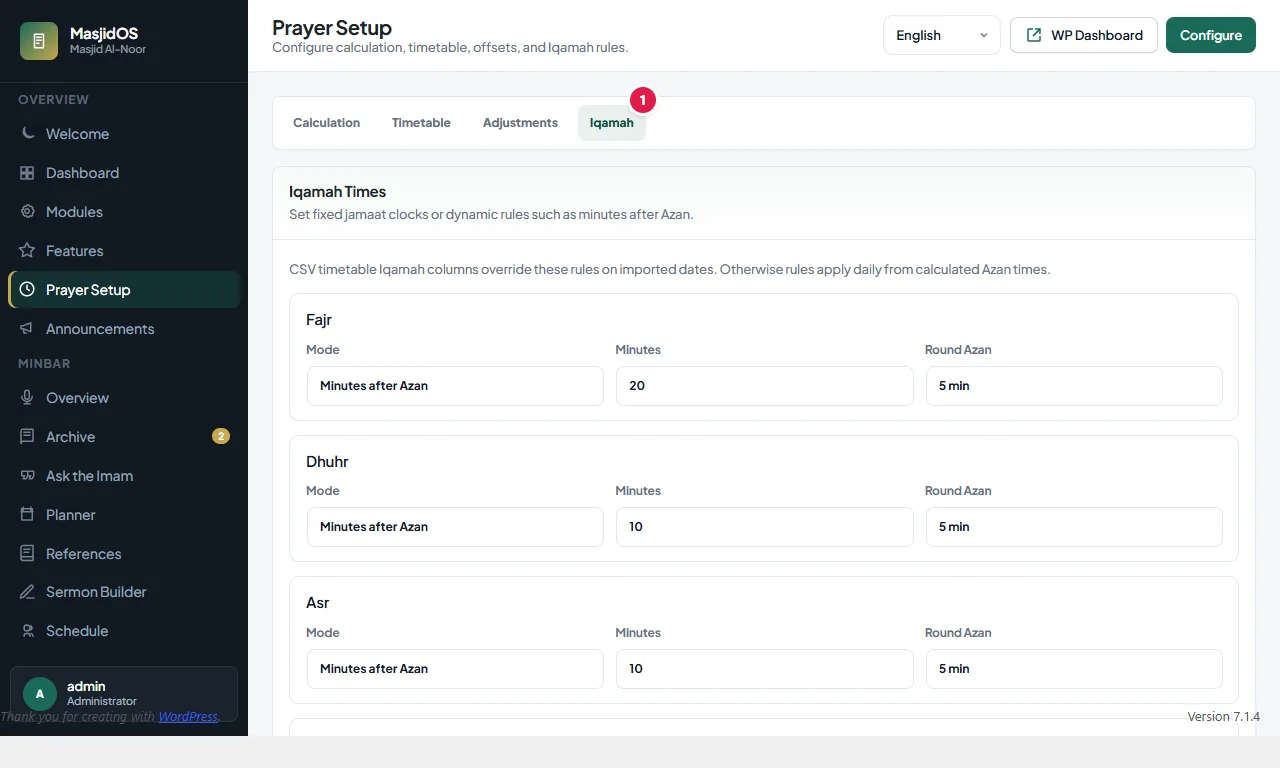
Each of the five prayers has a rule. Open MasjidOS → Prayer Setup → Iqamah and choose how its Iqamah time is set:
- Fixed time: you type a clock time, such as 13:15.
- Minutes after Azan: a number of minutes after the prayer starts.
- Minutes before Sunrise: for Fajr only.
- Hidden: no Iqamah time is shown for that prayer.
For Minutes after Azan there is also a Round Azan choice (none, 5, 10 or 15 minutes). It rounds the azan time up first and then adds your minutes, so an azan at 13:07 with rounding set to 5 and 10 minutes after becomes 13:10 and then 13:20. This keeps the Iqamah time tidy instead of moving a minute at a time.
Iqamah times from a CSV timetable override these rules on the dates you imported. Iqamah times appear in the prayer widget (iqamah="yes"), the monthly timetable (iqamah="yes") and on the TV display.
Monthly timetable
Put [masjidos_monthly_prayer_times] on a page for the full month. Visitors can move between months and years without a reload, and there are Current Month and print buttons that print only the timetable.
[masjidos_monthly_prayer_times iqamah="yes"]
[masjidos_monthly_prayer_times month="3" year="2027" design="compact" navigation="no"]
Use your own printed timetable
If your mosque follows a fixed printed timetable, open Prayer Setup → Timetable and upload your year timetable as a CSV. Imported dates override calculated times. The CSV needs a header row with a date column, then any of fajr, sunrise, dhuhr, asr, maghrib and isha for the start times, and fajr_iqamah, dhuhr_iqamah, asr_iqamah, maghrib_iqamah and isha_iqamah for the Iqamah times (common spellings such as zuhr and jamaat are understood). MasjidOS checks the file first and reports any errors. Imported dates use your numbers, and other days stay calculated. The same screen shows the coverage of what you imported and a monthly grid where you can override a single day by hand when your committee sets a custom time.
You can also export the timetable, and MasjidOS publishes a SalahAPI document so other apps can read your times.