Accessibility toolbar and profiles
Give visitors font, contrast, reading and navigation tools, with one-click profiles.
On this page
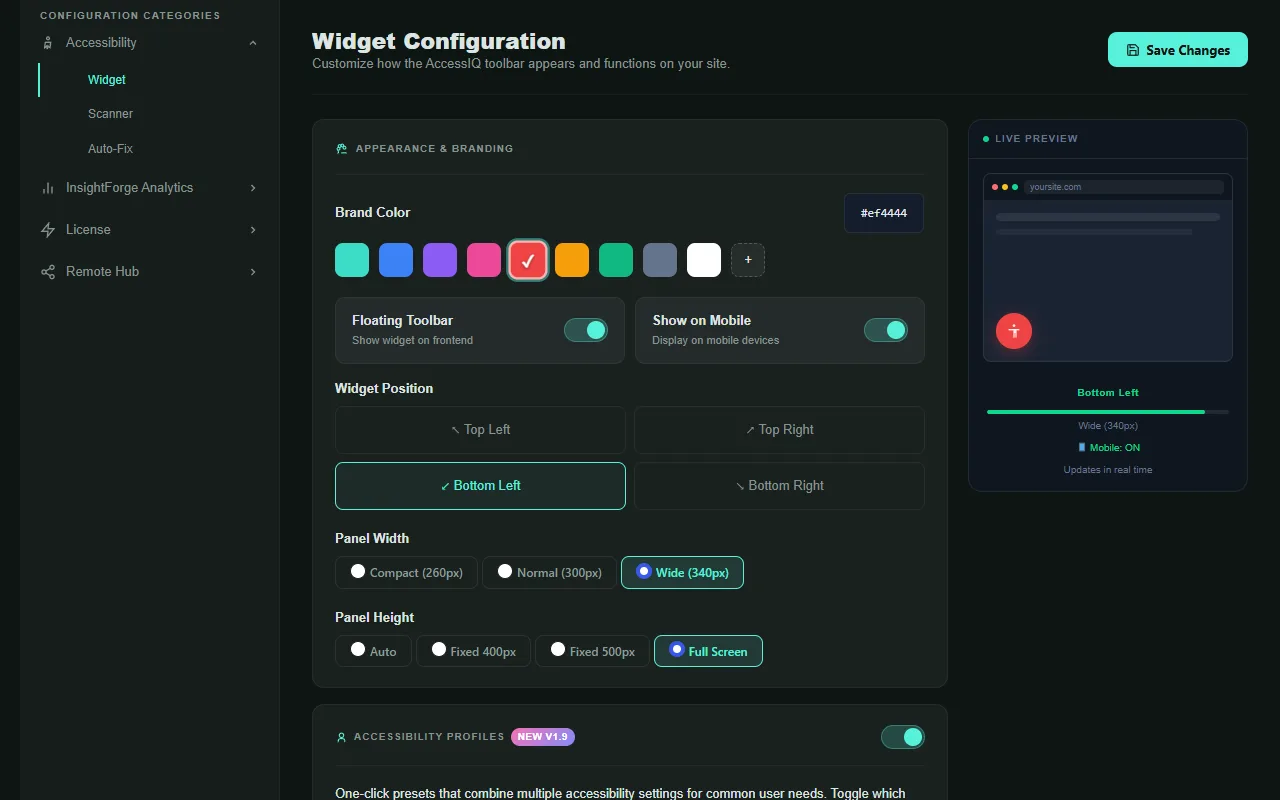
The toolbar is a button on your site that opens a panel of accessibility tools. Visitors adjust the page to suit them, and the choice is remembered in their browser. Turn it on or off with Floating Toolbar in Settings → Accessibility → Widget.
The 15 tools
- Font size (80% to 150%), letter spacing (0 to 5 px) and line height (3 levels)
- Dyslexia-friendly font
- Reading line and reading mask
- High contrast and monochrome, with low, normal or high saturation
- Highlight links and highlight titles
- Stop animations
- Big cursor in 4 colours
- Keyboard navigation and screen reader optimisation
Profiles
A profile switches on a set of tools at once. There are five: Vision Impaired, ADHD Friendly, Seizure Safe, Dyslexia and Keyboard Only.
Make it yours
- Brand Color, Floating Toolbar and Show on Mobile switches, and Widget Position (4 corners)
- Panel Width (Compact 260, Normal 300 or Wide 340 px) and Panel Height (Auto, Fixed 400, Fixed 500 or Full Screen)
- Theme: dark, light or system
- On phones under 480 px the panel opens as a bottom sheet. You can also hide the toolbar on mobile.
Developers can change the settings with the accessiq_widget_config filter.
The toolbar helps visitors, but it does not replace an accessible site. Fix the problems the scanner finds too.