In this article
Google Consent Mode v2 lets your Google tags know what a visitor agreed to. The first decision is what the tags are told before anyone has chosen anything: that is the default. Most sites deny everything. Some sites want to treat visitors in different regions differently. This guide explains both choices, one trap that catches many sites, and how to check the result. It uses Consentaro, a free plugin on WordPress.org. For the basics, start with Google Consent Mode v2 for WooCommerce, in plain English.
What the default does
Consent Mode works with four signals. Your page sends a default command that sets each one to granted or denied, and later an update command with the visitor’s real choice. Two rules matter:
- The default command must run before any Google tag.
- There should be only one default command. A second one from another plugin or theme script can overwrite it.
Consentaro sets the defaults to denied before any Google tag runs, and updates them when the visitor makes a choice. Google Tag Manager loads only after a choice.
Choice 1: deny everything until the visitor chooses
This is the default and the simplest. Every visitor, everywhere, starts as denied. It does not depend on guessing where someone is, so it cannot be wrong about a visitor’s location. If you are unsure, use this one.
Choice 2: deny only in the EU, EEA, UK and Switzerland
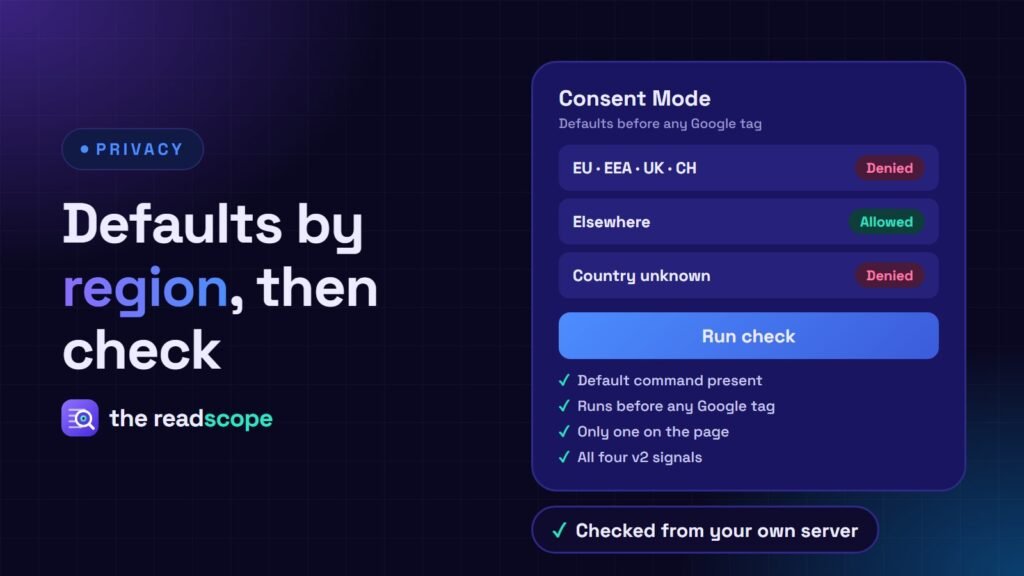
Some sites want tags to run normally outside those regions. Consentaro 1.8.0 has an optional setting for it: deny only in EU, EEA, UK and Switzerland, and allow elsewhere. Three things to know before you switch it on:
- It is a legal decision. Some US states, for example California, and other regions also have consent rules. Ask a qualified professional which laws apply to your visitors.
- It needs the country. The option works only while the geo-based banner is on and the visitor’s country is known. If Consentaro cannot tell where someone is, everything stays denied.
- Caching can undo it. A cached page can be served to other visitors. A page first requested from outside the EU may later be served to an EU visitor, who then sees no banner. Google’s region rule still keeps Google tags denied by default, but Consentaro’s script blocking does not apply on such a cached page, so other trackers, such as Meta Pixel, can run.
If you need certainty, exclude those pages from full-page caching, vary the cache by country, or leave the option off.
Two optional Google settings
Under Consentaro → General → Consent Mode there are also two optional settings, both off by default. They change what is sent to Google, so check them against your privacy policy first.
- url_passthrough lets Google keep ad-click information in page URLs while ad storage is denied, so conversions can still be measured without cookies.
- ads_data_redaction removes ad-click identifiers from requests sent to Google while ad storage is denied.
The same card has a “wait for update” time of 0 to 2000 ms. Untouched, all three settings behave as they did before.
How to check it
A default that is missing or late is easy to miss, because the page still looks fine. Press Run check on the same Consent Mode card. Consentaro loads your home page from your own server, so nothing is sent to a third party, and reports whether:
- its default command is present,
- it comes before any Google tag,
- it is the only one on the page, and
- it includes all four Consent Mode v2 signals.
Some hosts block this kind of request. The result then says “unknown”, and you can use View Source and search for data-consentaro-consent instead. Test in a private window as well, because an earlier choice may be saved in your browser.
Keep a record of what was decided
If you turn on the optional Consent Log, each row now also stores the consent policy version and the visitor’s country code, and never an IP address. For why a record matters, read Do you need to keep a record of cookie consent? What to store, and what not to.
When to add more
The free plugin covers everything above. The optional Consentaro Pro add-on needs the free plugin and adds per-region rules: choose ask first, notice with opt-out, or no banner, region by region. EEA, UK and Switzerland always ask first, and Global Privacy Control is honoured. Add it when you serve several regions and need different rules for each.
What this does not do
Consentaro helps you ask for and respect consent. It is not legal advice and does not replace a privacy policy or a review for your region.
Frequently asked questions
Does Consentaro deny everything by default?
Yes. It sets the Consent Mode defaults to denied before any Google tag runs, then updates them when the visitor chooses. The regional option is off unless you turn it on. Q: What happens when the visitor's country is unknown? A: Everything stays denied. The regional option works only while the geo-based banner is on and the country is known. Q: How do I check Consent Mode is working? A: Go to Consentaro, General, Consent Mode and press Run check. It loads your home page from your own server, so nothing is sent to a third party. Q: Is this legal advice? A: No. Which laws apply depends on your visitors and business, so ask a qualified professional.