In this article
A mosque runs on trust. People give more, and give more often, when they can see what was raised and what it was spent on. Most committees already want this. What stops them is the work: notebooks, messages with screenshots, a spreadsheet one person understands. This guide describes a simple setup that a volunteer committee can keep up with.
Step 1: Turn each appeal into a campaign
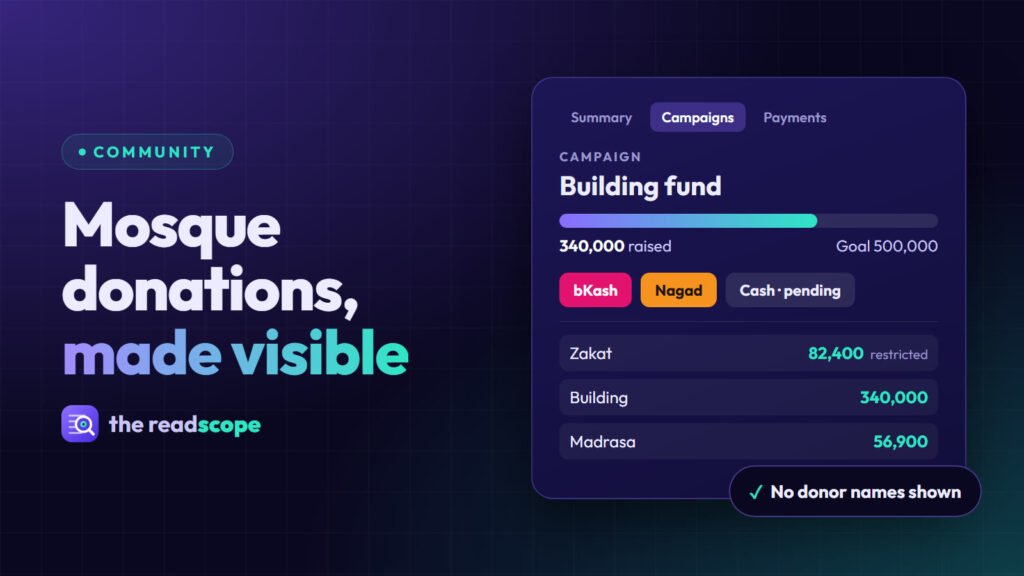
“Support the mosque” is vague. “Roof repair, goal 500,000” is clear. Give every appeal a title, a goal and an end state. In MasjidOS Pro, MasjidOS → Donations → Campaigns holds each one, and you can link it to a fund so the money lands in the right place. Show it on any page with a shortcode:
[masjidos_donation_form campaign="building-fund"]
[masjidos_campaign slug="building-fund"]
The first is the donation form. The second shows the goal, progress and recent donors, which is the part that makes people feel part of something.
Step 2: Make paying easy, and verify it
Most donors will not come to the office. Let them pay from their phone with the method they already use. MasjidOS Pro supports bKash and Nagad: you add your merchant credentials under Payments, and the credentials never reach the public page. The donor is sent to pay, and the plugin then checks the payment with the gateway from your server before marking it completed. A repeated callback does not post the money twice.
Test with Sandbox credentials first, then switch to Live. Online methods only appear once a gateway is set up, and they follow the site currency, which today is meant to be BDT.
Step 3: Keep cash honest
Cash and bank transfers are still part of life. The safe rule is that nothing counts until a person confirms it. In MasjidOS those gifts stay pending and do not count toward the raised total. When a committee member confirms the gift, it becomes completed, income is posted to the ledger and a receipt is sent if you turned that on and the donor gave an email. A cancelled or refunded gift reverses the ledger entry.
- Two people should be able to see the pending list, not just one.
- Print the receipt and hand it over at the time of giving.
- Do not enter the same cash twice. Donations already post income, so skip the manual ledger entry.
Step 4: Separate the funds
Zakat, building money and madrasa money are not interchangeable. Keep them as separate funds. MasjidOS Pro comes with General, Zakat, Building, Madrasa, Sadaqah, Lillah and Fidya, and you can add more with an opening balance and a restricted flag. Moving money between funds is recorded as a pair of entries, so the history stays clear. Void an entry instead of deleting it, so there is always an audit trail.
Step 5: Publish a monthly report
This is the step that earns trust. Add one shortcode to a public page:
[masjidos_transparency_report]It shows a monthly statement with income, expense and net, and the balance of each fund, with a Print or Save as PDF link in an A4 layout. Donor names never appear. If you only want one fund on show, [masjidos_financials fund="zakat"] does that. Public pages show only while public transparency is on, and it is on by default, so check the setting before you publish anything you did not intend to.
The committee can set monthly budgets per fund, print a statement and lock a month, so a closed month refuses new ledger saves until someone unlocks it.
A simple monthly routine
- First week: confirm every pending cash and bank gift from last month.
- Record expenses with a fund, a category and a reference.
- Check the Summary for budget against actual.
- Lock the month.
- Share the link to the report in your usual group or at Jumuah.
What this does not do
Software does not replace a committee decision on how funds may be used, and it does not give religious rulings. It only makes the record clear and easy to share. Decide your own rules for restricted funds, and write them down where members can read them.
If you are still setting up the rest of your site, A mosque website checklist: 12 things every masjid site needs lists what a mosque website should have.
Frequently asked questions
Can donors pay with bKash or Nagad on the mosque website?
Yes, with MasjidOS Pro. You enable bKash and/or Nagad under Payments, choose Sandbox or Live and add your merchant credentials. The donor is redirected to pay, and the plugin verifies the payment with the gateway on your server before marking it completed. Online payments follow the site currency and are meant for BDT today.
What happens to cash and bank transfers?
Cash, bank transfer and other methods are always available. They stay pending until a committee member confirms them, and a pending gift does not count toward the raised total.
Will the public report show who gave?
No. The monthly transparency report never shows donor names. It shows income, expense and net, and the balance of each fund.
Can I keep Zakat money separate from other funds?
Yes. Funds such as Zakat, Building, Madrasa and Sadaqah come ready-made, and a restricted flag marks funds that need extra care.