Statement and badge
Generate an accessibility statement from your latest scan, publish it in one click and add a badge.
An accessibility statement tells visitors how accessible your site is and how to reach you about problems. Open AccessIQ → Accessibility Statement.
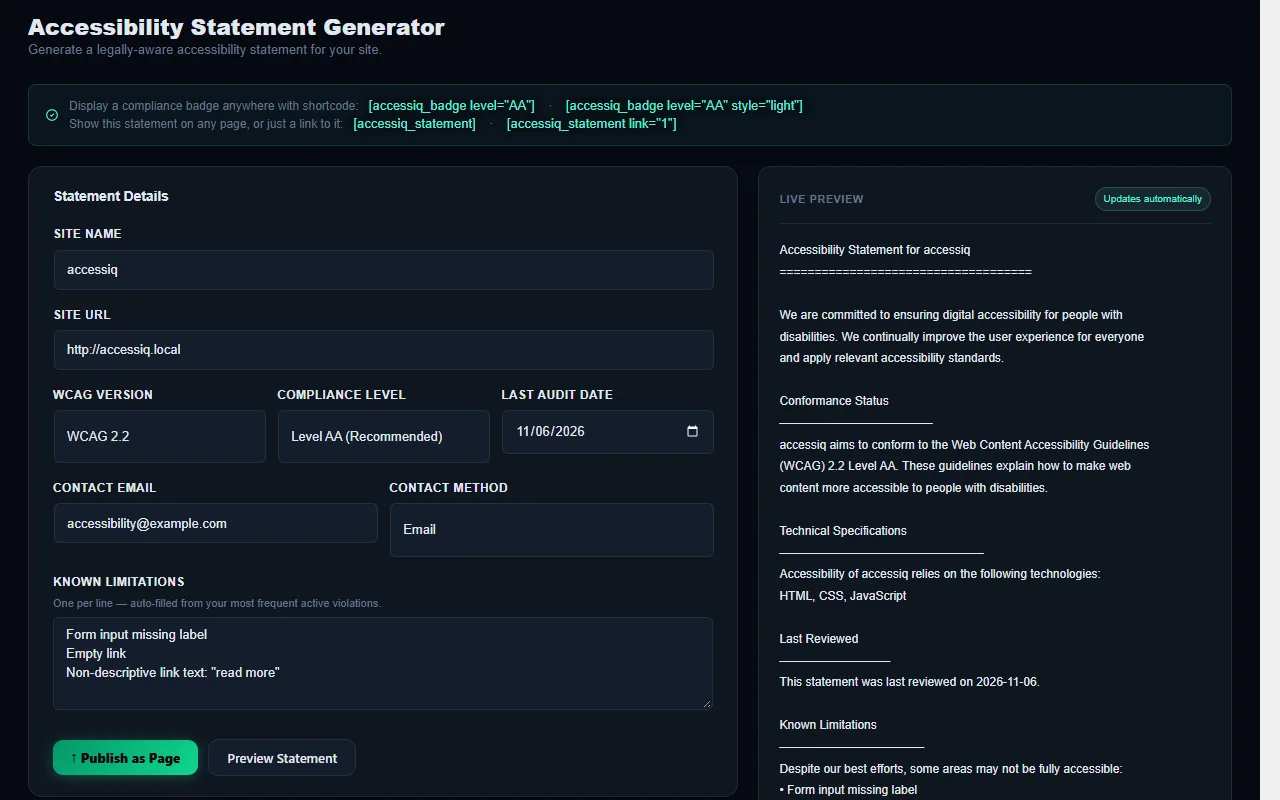
Generate and publish
- The form has the site name and URL, WCAG version, compliance level, last audit date, contact email and method, and Known limitations. It fills in what it can, including your most frequent active violations as known limitations (one per line).
- Edit anything. A live preview updates as you type, and Preview Statement shows the final text.
- Click Publish as Page to create the page in one click.
Be honest in a statement. Say what is not yet accessible and when you plan to fix it.
Shortcodes
| Shortcode | Result |
|---|---|
[accessiq_statement] |
Shows the statement. Add link="1" to show a link to it instead. |
[accessiq_badge] |
Shows a badge, by default “Committed to WCAG 2.2 AA”. Options include level="AA", style="light", version="2.1" and claim="compliant". |
Only use claim="compliant" if you have checked that your site really is compliant. The widget footer can also link to your statement.