How to set up a prayer times TV display for your mosque lobby
Turn any TV or Chromebox into a live prayer times board: what to show, what hardware to use, and how to keep it running all day without attention.
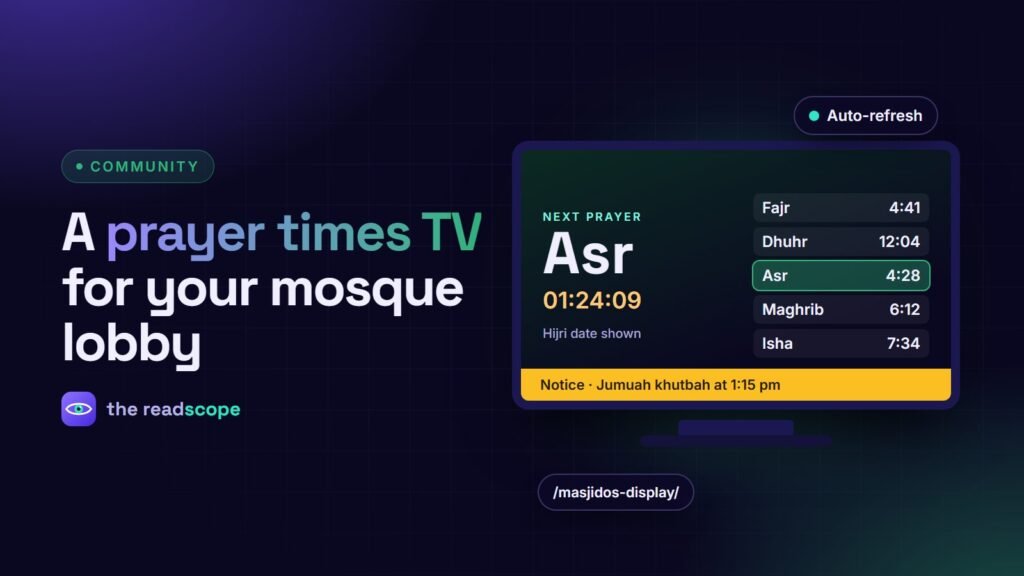
A prayer times board in the lobby is one of the most visible things a mosque can do for its community, and it no longer needs custom signage hardware. Any TV or small computer with a browser can show a live, always-correct display. Here is how to plan one that runs all day without anyone touching it.
What a good board shows
- The next prayer and a countdown, readable from across the room
- All five prayers with iqamah (jamaat) times
- The Hijri and Gregorian dates
- Jumuah information and the khatib when relevant
- Rotating notices and events
- The mosque’s name and logo
Keep text large and contrast high. People read it from a distance and often in a hurry.
Hardware options
| Option | Pros | Cons |
|---|---|---|
| Smart TV browser | No extra device | Browsers can be slow and update rarely |
| Chromebox or mini PC | Reliable, easy kiosk mode | Small extra cost |
| Streaming stick with a browser | Cheap and tiny | Limited memory, restarts needed sometimes |
Whatever you choose, use a wired network if you can, and plug the device into a socket that is not switched off at night by mistake.
Set it up once
- Make sure your prayer times are correct on the website first. See How to publish accurate prayer times on a mosque website.
- Open the display page on the device and bookmark it as the start page.
- Switch the browser to fullscreen or kiosk mode.
- Disable sleep, screensaver and automatic updates that restart in the daytime.
- Enable “restore last session” or “open this page on start” so power cuts recover on their own.
Use a page that looks after itself
MasjidOS includes a fullscreen display at /masjidos-display/. It shows live times, a next-prayer countdown, the Hijri date, notices and mosque branding, with themes, layouts, font size and logo set in Settings. The page reloads automatically every 15 minutes and refreshes immediately when the browser reconnects after a network drop. Its fonts are stored with the plugin, so the screen does not depend on an outside font service.
Keep notices fresh
Add announcements with start and end times so old ones disappear on their own. A ticker for reminders (for example Eid prayer times or a fundraising update) works well, and a seasonal theme such as the Ramadan style can make the board feel current.
A simple maintenance routine
- After clock changes (daylight saving, where used), check the timezone and times against your timetable.
- Once a month, view the screen from the back of the room and check readability.
- Keep a note of who restarts the device if it ever freezes.
Confirm prayer times with your local religious authority before showing them publicly.
Frequently asked questions
What hardware do I need for a mosque TV display?
Any TV with a web browser, or a small device such as a Chromebox or mini PC connected by HDMI. A wired network connection is more reliable than Wi-Fi.
How do I stop the screen going to sleep?
Turn off sleep and screensaver in the device settings, and use a browser kiosk or fullscreen mode.
How do I show notices on the display?
Add scheduled announcements in your mosque plugin and enable notice rotation on the display page.
Will the display update itself?
A good display page reloads on a timer and when the network reconnects, so it recovers from outages without anyone touching it.